Dev Log 07 - WuMe Moves To Substance
- Callum Winfield

- Apr 29, 2021
- 2 min read
Updated: May 20, 2021
Once the Retopology was completed on Wume it was time that I exported him as an OBJ into substance to be textured. Nothing much to say about the retopology, I feel like I've gotten as good as I could get without an industry professional actually having a look at my work and giving me pointers.




There was one part of him I had planned not to take into substance, this part was the wings as I had seen a video on Instagram detailing uses for the grease pencil in the 2D animation work space. This new method I learnt allowed me to trace over actual reference pictures of insect wings and convert to a mesh.


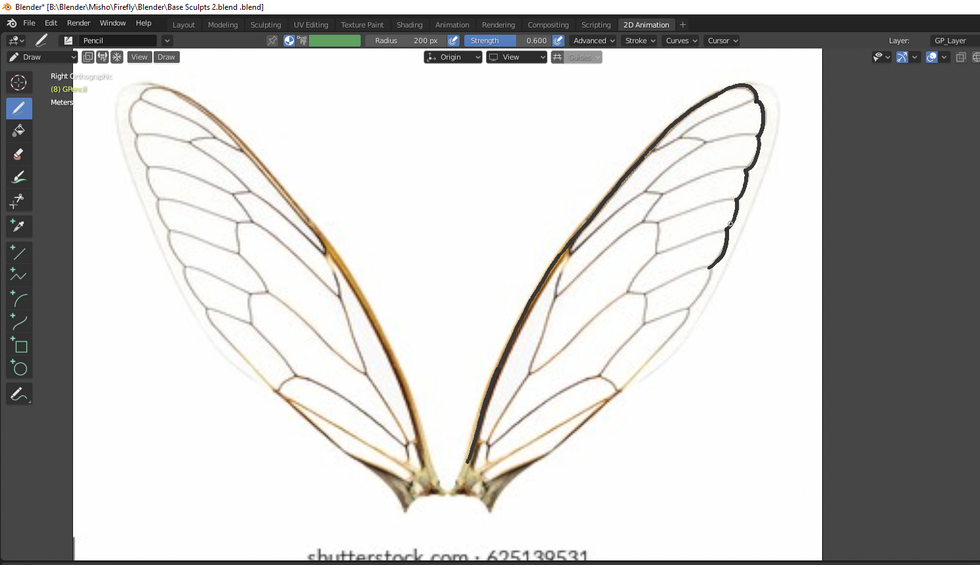


Once it was sketched out and converted to a mesh I added a very simple translucent node set up which would distort light to give the effect of insect wings. Overall this new grease pencil method was extremely effective and could easily be used to create more intricate designs that are made in concept art such as the talismans and hieroglyphics designed be Leo and Patrick in their concept work.

Once this was done and my usual baking process was complete which is detailed in my 3D lecture, it was time to paint.

I heavily stuck to the colours found on firefly's, using the colour picker tool on my reference page to get the exact hues and colours. The details on the skin and shell are nothing to extremely new, with all the same techniques I had used in semester one on my character for membrane coming back here. With the process of picking a base colour, duplicating this layer making it darker for the Lowlights and Lighter for High Lights then applying grunge smart masking to capture the Low Lights in the crevices and Sharp Edge and Dust Build up smart masks to show the Hight Lights on high surfaces and edges of the shells.


The glowing effect was something new though with me having to find out how to paint with an emission layer. This was simple enough with it just being an easy setting turned on in the texture settings panel. This will come in handy for future designs and it is to note that an opacity option as well was in these settings which I would love to try out in the future, either in this project or a personal project.

I then finished of by highlighting some areas with a quick smart material I had created similar to the main bug shell material now just a vibrant orange as seen on real world Fireflies. Below you can see where I was with the model after a couple of days of working on this character in substance. Overall I'm happy with the look soo far with this being a design where I can have a lot of fun with, the group also seemed to like the design in the slack group chat. I've also been able to learn a couple of new methods in substance painter and in blender through working on him so I'm pleased with everything to do with this model.


Comments