Dev Log 09 - Moving on and Following Action Plan
- Callum Winfield

- May 8, 2021
- 3 min read
Updated: May 20, 2021
WuMe Recovery and Further Steps
So with the loss of my work I found that I could recover a partially up to date version of Wume in the blender recovery folder. So with this now recovered here is my daily plan.
- 8th -11th -- Finish Wume model and have exported into the Unity File with all textures complete
- 12th - 15th -- help with environment assets as I believe Kai might be struggling with the workload though I will talk to him first and re sculpt and model Misho
- 15th - 17th -- retexture Misho and set him up in the unity file
- 17th - 20th -- finish rendering characters and editing blog post reflections.

I started off By going back and retexturing Wume, sticking to all the main methods and design choices I had in the previous version.


I did mess around with the idea of the glowing being more magical, with the glow cracking into his body though I felt like this was cool it ruined the innocent natural look of him.


I then researched the actual process of Bioluminescence to see if there was any natural details to include, though it had seemed like I was pretty spot on with the original design.




When making the orange highlights this time round I looked more into insect reference and found that highlights on the shell have a more speckled look instead of the flat highlight I worked on before. This mistake was my fault and made me realised even though I use a high amount reference I should study that reference at every stage of production on a model.


Below you can find a video demonstrating the full rig I created for this character with him being ready for animation and game ready.
Extra Environment Work
After talking to Kai who was in charge of environment models, there has been some worries as to the amount of work been set to him with him struggling to get his models ready for unity. Me and raf will continue to help him the best we can but just encase he cant get all of his models done to make sure that there's still a good amount of environment assets I've decided to quickly work on some in the down time of the characters.


As Kai was focusing on trees so encase he gets them game ready I've decided to do large mushrooms as they wont clash with his trees. I quickly sculpted out there shape referring to reference, making a variety of mushrooms and rocks.


I then after completing the process of unwrapping and retopology took them into substance painter and created smart materials for the rocks and mushrooms so they can quickly be applied to each model.


As I had learnt with Wume it was important to constantly refer to reference to get the best look so I made sure every step of the way in making these assets to refer to a mushroom pure ref document. Working on these assets also allowed me to mess around with the opacity setting I had found earlier when working on Wume. I used this new found layer option to make mystical ghost like mushroom that I feel fit in with the fantasy vibe. I also learnt the overall process of making this opacity layer is very simple so in future characters, I now have a new way to achieve design options.


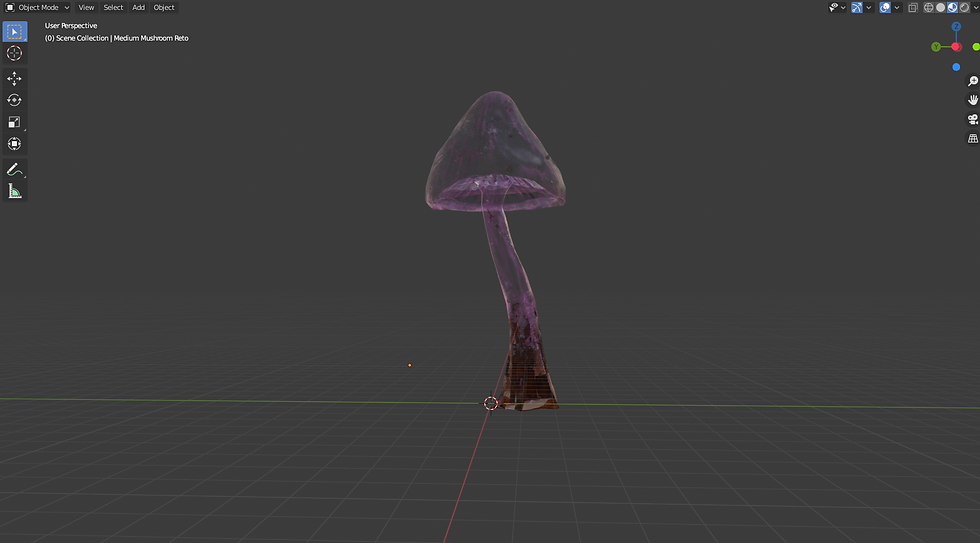
As you can see below, I have all the completed game ready assets that I will import into the unity folder. This exercise showed me that even with my assigned work I can always help and improve the game in other ways especially a task like this which I can complete in an afternoon.


Comments